
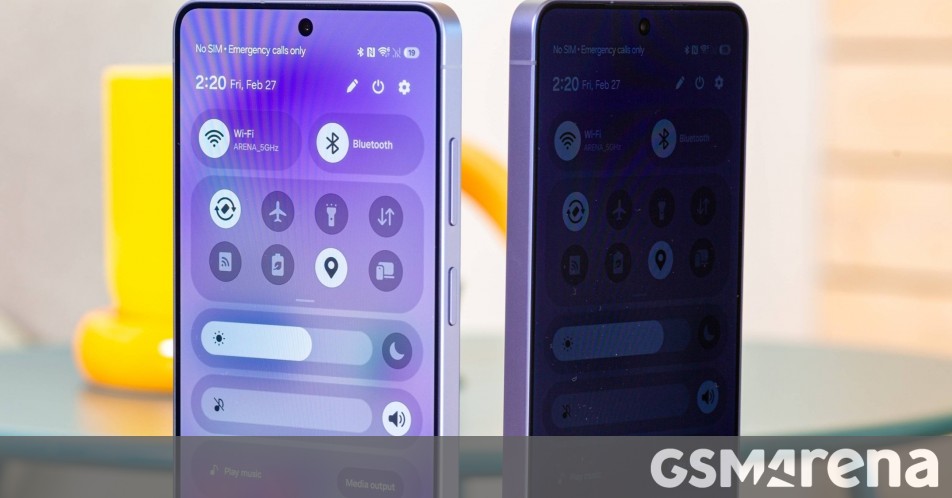
Samsung's Galaxy S26 Ultra introduces a Privacy Display feature that uses hardware filters to make the screen difficult to view from angles. The technology works by dividing pixels into Narrow and Wide groups, with Narrow Pixels having taller walls that block side viewing. This creates a zero-peek effect that prevents others from seeing your screen content.
When activated, the Privacy Display halves maximum brightness by reducing Wide Pixels' output, dropping peak brightness to around 800 nits. The pixel density also decreases since fewer pixels light up. Users can enable the feature for specific scenarios like notifications, passwords, or PIN entry fields, with support limited to system apps and the lock screen for now.
The feature offers two modes: standard Privacy Mode, which still allows some visibility at angles, and Maximum Privacy Mode, which severely impacts contrast and color reproduction. In Maximum Mode, blacks become gray and contrast drops dramatically, making the screen nearly impossible to see from the side but significantly degrading the viewing experience. With Privacy Display off, the S26 Ultra's screen performs identically to last year's S25 Ultra.
Source: GSMArena · Summarized by HeadlinesBriefing