
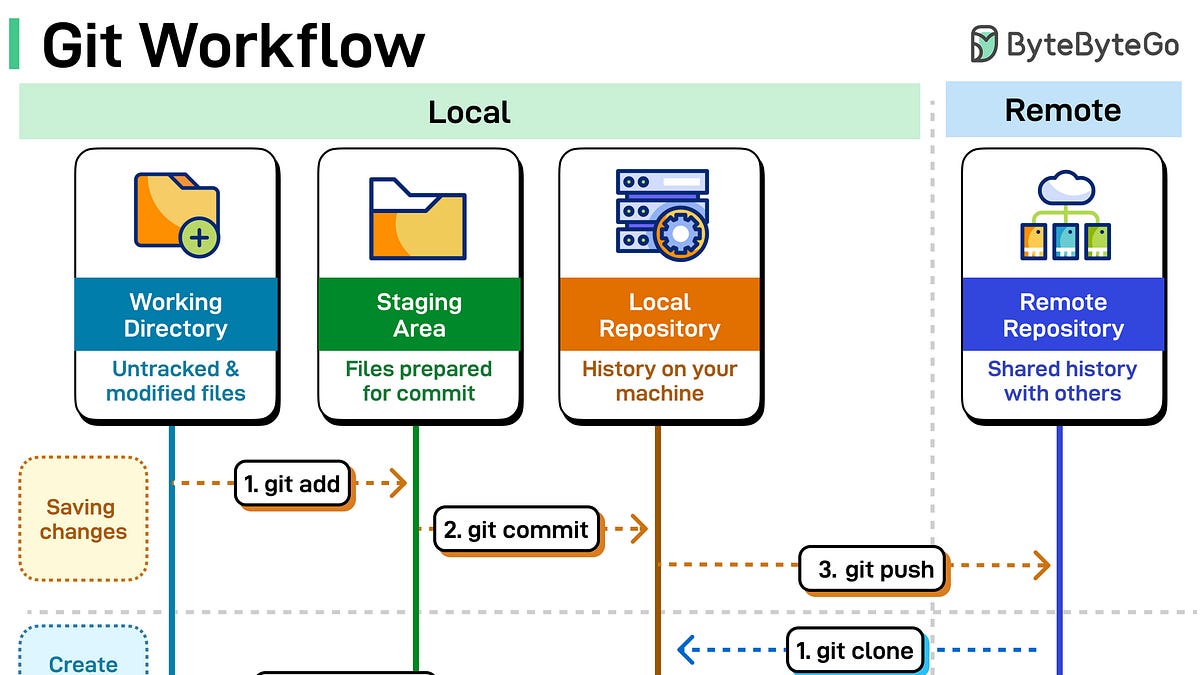
Git workflows often fail not from complexity but from confusion about where code lives. This guide breaks down the four key spaces—working directory, staging area, local repo, and remote repo—and shows exactly how commands move code between them.
Saving your work starts with `git add` moving files to staging, then `git commit` saving them locally, and `git push` uploading to remote. Getting a project means `git clone` for the full repo or `git checkout` for a specific branch. Syncing changes uses `git fetch` to download without applying, `git merge` to integrate, or `git pull` for both at once.
The safety net comes from `git stash` for temporary saves, `git stash apply` to restore, and `git stash pop` to restore and clear. Understanding these commands prevents the common workflow breakdowns that frustrate developers.
Source: ByteByteGo · Summarized by HeadlinesBriefing