
TCL made a big jump with the P80 series of phones – these are the first to have Nxt Paper displays based on OLED panels instead of LCD. The key benefits are the usual – higher brightness, greater contrast, punchier colors – but the company made sure that these advantages didn’t come at the cost of a reduced Nxt Paper experience. The Nxt Paper brand has been around for a few years now – it aims to give the display a paper-like feel and comfort when reading. Yes, e-ink displays exist and there are even some e-ink phones out there. However, despite years of improving frame rates and colors, e-ink is still better-suited for e-book readers than for smartphones. Speaking of which, the P80 models make for fine e-book readers themselves.
The TCL P80 Pro has a 6.83" OLED display with 3,200 nits peak brightness. Compare that to the TCL Nxt Paper 70 Pro, for example, whose LCD only manages 900 nits in High Brightness Mode. The difference is tangible – yes, Nxt Paper technology includes a Nano Crystal Shield Glass, which reduces glare, but both the LCD and the OLED displays get the same advantage. And the extra brightness of the OLED panel makes for much better outdoor viewing.
The display has a matte surface, unlike most smartphones out there, which leave their front glass with a glossy finish. You can barely see it indoors, but once you go out in the sun, the difference is quite obvious – you don’t get the annoying reflection hot spot that you do with a glossy display. Instead, the display remains fully legible. At glancing angles, the matte finish gets overwhelmed, but when looking at it head-on it really does conjure up associations with reading a piece of paper.
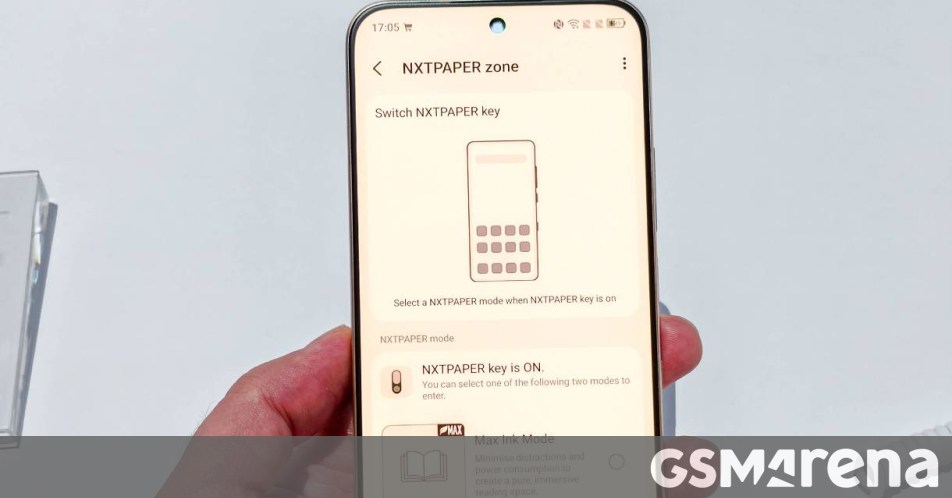
The P80 Pro (along with the Ultra) has the Nxt Paper Key – a toggle on the side of the phone. This can enable Max Ink or Paper Mode (both are customizable). Paper Mode turns the display monochrome – black text on a white-to-yellow background (you can adjust the color temperature in the settings). This high-contrast view reduces distractions and makes text easier to read. Max Ink mode uses the same visuals, but it also enables a sort of Do Not Disturb mode. Background apps are put to sleep and while you can still receive calls and texts, most notifications will be muted (again, no background apps). This also extends battery life – the P80 Pro is equipped with a 5,800m Ah battery with 45W charging. With Max Ink enabled, the P80 Pro should last you up to 7 days of reading.
Source: GSMArena · Summarized by HeadlinesBriefing