
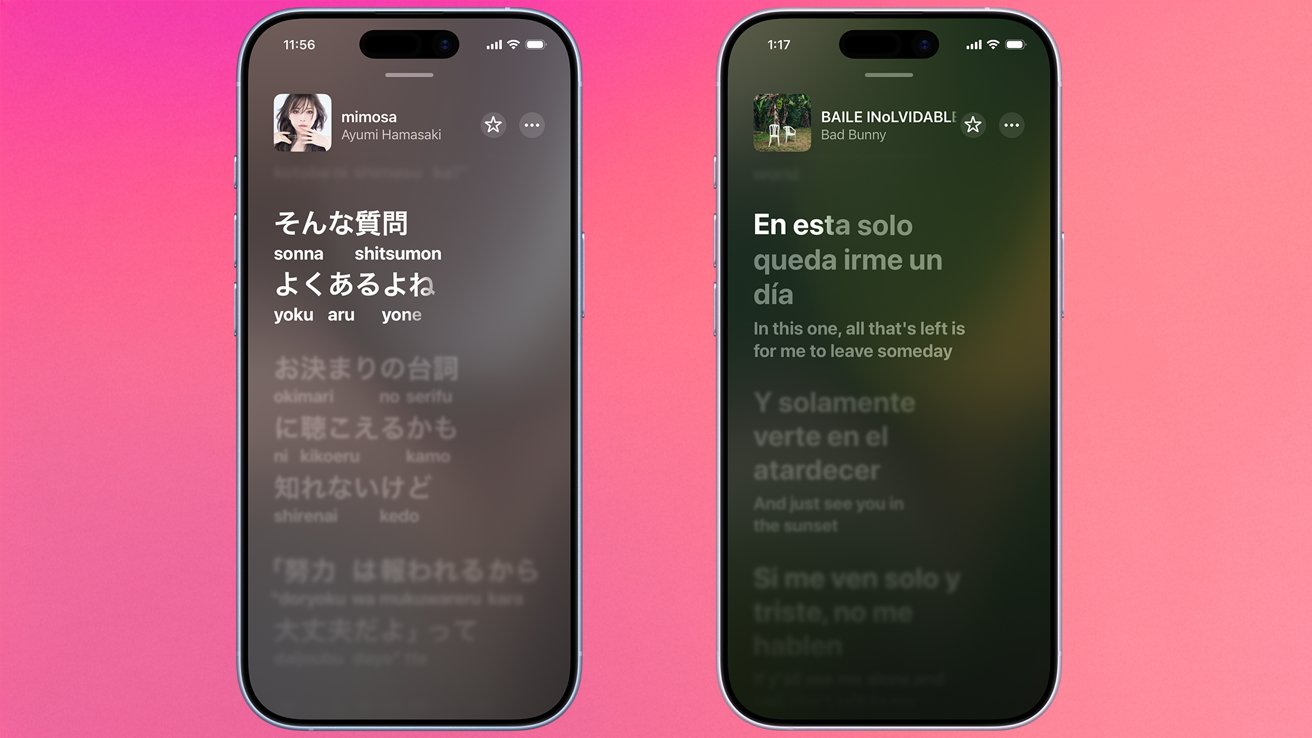
Apple’s latest iOS 26 update adds two new tools to Apple Music: Lyrics Pronunciation and Translations. The former supplies phonetic guides so listeners can sing along to foreign tracks without knowing the language, while the latter offers line‑by‑line meanings. The move follows growing demand for immersive listening experiences worldwide for music lovers across the globe daily.
To use either tool, launch Apple Music on an iPhone or iPad, locate a track, and tap the quotation‑mark lyric button near playback controls. Time‑synced lyrics appear for most recent releases, sometimes in karaoke style. If a song lacks synced text, the app simply lists the lyrics or hides them altogether for your listening pleasure.
Users toggle between pronunciation and translation by tapping the left‑hand button that reads 'Show Translation'. The default view shows phonetic cues beneath the lyrics when available. Switching back returns to the original synced text. Note that these options work only on iPhone and iPad; Apple TV and macOS clients have no such feature for now.
Because not every track includes phonetic or translated data, users may find gaps. The translations respect the device’s preferred languages, so a Spanish‑speaking user will see subtitles in Spanish when available. For those seeking full control, third‑party subtitle apps still offer broader coverage, but Apple’s built‑in system streamlines the experience within the native ecosystem today.
Source: AppleInsider · Summarized by HeadlinesBriefing